Saturday, May 10, 2008

Youtube API usage

Authentication

       http://code.google.com/apis/youtube/developers_guide_protocol.html
       It is recommended that you include the proper authentication headers in all of your requests even if those requests do not explicitly require authentication.
       A request must include the X-GData-Key and Authorization headers.
       The X-GData-Key header specifies your developer key, a value that uniquely identifies your application(s). The Authorization header specifies a token that you obtain for each user using one of two authentication schemes, AuthSub or ClientLogin. Headers are like this:

AuthSub

ClientLogin

Authorization:AuthSub token=<authentication_token>

X-GData-Key: key=<developer_key>

Authorization:GoogleLogin auth=<authentication_token>

X-GData-Key: key=<developer_key>

(1)    Functions supported in AuthSub
http://code.google.com/apis/accounts/docs/AuthForWebApps.html

(1.1)           AuthSubRequest

       A call to this method sends the user to a Google Accounts web page, where the user is given the opportunity to log in and grant Google account access to the web application. If successful, Google provides a single-use authentication token, which the web application can use to access the user's Google service data. This is done by using GET to a specific formatted URL.

Sample URL

https://www.google.com/accounts/AuthSubRequest?scope=http%3A%2F%2Fgdata.youtube.com&next=http%3A%2F%2Fzhguo.blogspot.com

(1.2)           AuthSubSessionToken

       A call to this method allows the web application to exchange a single-use token for a session token.

Sample request
       curl https://www.google.com/accounts/AuthSubSessionToken --header ‘Authorization: AuthSub token="token"’

Response

Token=DQAA...7DCTN

Expiration=20061004T123456Z

(1.3)          AuthSubRevokeToken

       A call to this method revokes a session token. Once a token is revoked it is no longer valid.

Sample Request
       curl https://www.google.com/accounts/AuthSubRevokeToken --header ‘Authorization: AuthSub token="token"’ 

(1.4)           AuthSubTokenInfo.

       A call to this method verifies whether a specified session token is valid and returns data associated with the token. This operation applies to both one-time-use and session keys.

Sample request

         curl https://www.google.com/accounts/AuthSubTokenInfo --header 'Authorization: AuthSub token="CO7xhO-6GhDT5f2tAwd"'

Sample response

Target=http://www.yourwebapp.com

Scope=http://www.google.com/calendar/feeds/

Secure=true

(2)    ClientLogin

       http://code.google.com/apis/accounts/docs/AuthForInstalledApps.html

       Before using ClientLogin, you must have an existing Google account. The POST request should be structured as a form post with the default encoding application/x-www-form-urlencoded. Parameters should be included in the body of the post.

Action URL parameter: https://www.google.com/accounts/ClientLogin

Sample request format:

POST /accounts/ClientLogin HTTP/1.0

Content-type: application/x-www-form-urlencoded


accountType=HOSTED_OR_GOOGLE&Email=jondoe@gmail.com&Passwd=north23AZ&service=cl&source=Gulp-CalGulp-1.05

CURL command
       curl    --location https://www.google.com/youtube/accounts/ClientLogin 
                   --data 'Email=username&Passwd=password&service=youtube&source=Test'
                   --header 'Content-Type:application/x-www-form-urlencoded' -i

Sample Response:

SID=DQAAAGgA...7Zg8CTN

LSID=DQAAAGsA...lk8BBbG

Auth=DQAAAGgA...dk3fA5N

 (3)    Difference of two mechanisms

       To use ClientLogin, a third-party application must own Youtube’s username and password of every user. Then the third-party application can do anything the end user can do. This mechanism is convenient for third-party apps to use because it does not require much intervening from users. However, it requires trust of users who may be afraid that their person information is not stored appropriately.

       To use AuthSub, a third-party does not need to own Youtube’s username and password of user. Instead, the user will be redirected to a web site from google to authorize third-party app’s access to user’s account. At first, third-party app is given a one-time access key which can be used to exchange a session key that can be used longer. This method is more secure for users at the cost of manually authorizing access requests.

Some development detail

(1)    Some videos are not allowed to be embedded in third-party applications.

       In the feed of these videos, mediagroup::content element does not exist!!! I manually construct URL by concatenating http://gdata.youtube.com/feeds/api/videos/ and video id and try to embed it into my app. As I expect, it does not work. However, I figured out a method which can work around this problem. I concatenate http://www.youtube.com/swf/l.swf?video_id= and video id and it works.

(2)    Some videos are not allowed to be commented by some users. These videos should be handled carefully.

       http://gdata.youtube.com/feeds/api/videos/gmNbl5ZTBZE

(3)    Duplicate elimination

       If you upload the same video clip more then once using different metadata, Youtube can figure it out and all uploads but the first one will be rejected. I am not sure how they compare two different video clips, maybe using MD5 to calculate a signature. The duplicate uploads are still displayed in your account. And all metadata is preserved except the video clip itself. The only difference between original upload and following duplicate uploads is that you can not play duplicate video clips.

clip_image002

As shown in above picture, metadata (e.g. description, tags, views, published time…) are still there. But the video clip itself is rejected

(4)    OpenSearch support

       If you search videos on Youtube, in returned feed openSearch extension is supported:

<openSearch:totalResults>274842</openSearch:totalResults>

<openSearch:startIndex>1</openSearch:startIndex>

<openSearch:itemsPerPage>25</openSearch:itemsPerPage> 

(5)    Navigation of many returned results.

       In returned feeds, if not all results are returned, there should be a link element in the feed. It is like this:

<link rel="next" type="application/atom+xml" href="http://... "/>

<link rel="previous" type="application/atom+xml" href="http://... "/>


Mashup Architecture

Architecture:
image

Adapter:

image

TODO:
Integrate authentication architecture.

Thursday, April 10, 2008

Add image support in web2.0 app

I added image support in the web2.0 app. It means that users can uploads image files besides regular text files. Users can attach tags, description and name when uploading an image. Other users can post comment/rating about the image.

When an image is uploaded, it will be stored somewhere at server side. Moreover, it can be retrieved by accessing a URL. In other words, the server generates a URL which can be used to access that image. When a user tries to retrieve the image, it will be displayed in browser by using img elment.

Currently, I am using suffix of file name to judge type of record (image or text). The advantage is that user intervening is not needed. Drawback is that sometimes suffixes are not accurate. It may be better to use MIME type which is specified when user uploads an object.

Tomcat virtual/physical path mapping

In my web2.0 application, users can upload files to server. I want to build mapping from virtual path to physical path. It means that the resources accessed are located in a separate directory instead of tomcat sub directory.

Context container can be used to achieve that goal. Official document is here http://tomcat.apache.org/tomcat-6.0-doc/config/context.html.
In my case, I modified configuration file server.xml and insert following text into Host element:

<context crosscontext="true" docbase="E:\\temp\imgService" path="/imgService"></context>

Actually, at first, I tried to modify context.xml instead of service.xml because it is less invasive. However, it didn't work and I don't know why.

A Simple Web 2.0 Framework

I have completed a simple application which supports common web 2.0 features: rating, commenting, tagging.
Demo address is: http://156.56.104.196:8080/tagService/index_ui.html.

The basic unit in my system is called record. A record is abstraction of an object. Theoretically, it can be of any type: image, text, presentation... However, the key issue is how to present different types of records to end users. Text is easy to present and it can be displayed to users directly. For image, img element can be used but it requires that the image be stored somewhere on the website so that it can be accessed by visiting a URL. Currently, only text is supported. When a user retrieves some record, text content of that record is displayed directly in browser.

Operations:
(1) Add a new record
Users add a new record by uploading a file to server and specifying name, description and tags. Then a unique id is generated for this new record at server side.
(2) List all records
Get all records in the system.
(3) Get a record based on its id
According to record id, get corresponding id.
(4) Get records according to tag
According to user-specified tag, corresponding records are returned. Currently, users can only specify a single tag.
(5) Post comment and rating of a certain record
Users can post comments and ratings about records.
(6) Comment and rating of comment.
Besides comments of records, comments of comments are supported. It means that users can post comments about existing comments besides records.

Architecture:
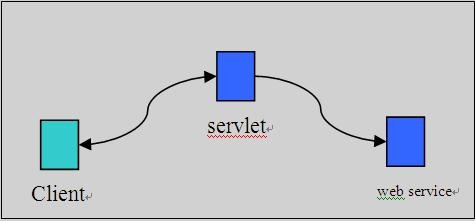
web20_arch_ws 
Client sends request to a server which uses servlet to handles it. Then the servlet accesses a web service which provides web 2.0 functionalities.

Presentation location:
What is stored in backend database is raw data. And it does not contain information about how to present it to end users. E.g. layout, font-size...
There are two strategies to transform raw data into final presentation data: server-side servlet and client-side javascript.
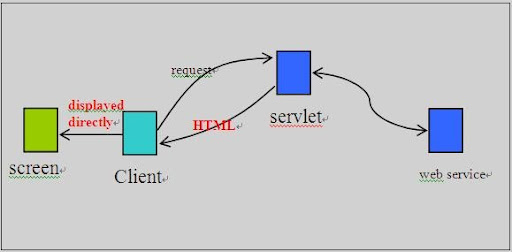
(1) Server-side servlet

web20_arch_html_ws
When servlet responds to user's request, a HTML document is returned. The HTML document does not only contains data but also contains presentation information. So it can be displayed directly. In this method, servlet formats the raw data received from web service into a corresponding HTML document.

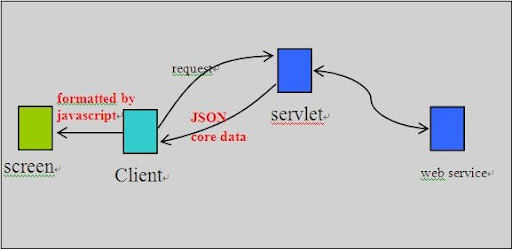
(2) Client-side javascript

web20_arch_json_ws 
In this method, servlet just returns raw data in JSON format. It means returned data does not contain any presentation information. And client side javascript displays the raw data in a specific manner. Actually, to use this method, AJAX should be used. Object XmlHttpRrequest can be used to make asynchronous request without refreshing whole page.

Personally, I prefer the second method.
I remember there are some server-side Java libraries which can be used to make transformation execute with ease.

AJAX
    AJAX is used frequently. However, the format of request is not XML. I manually compose POST query in Javascript and then send it by using XmlHttpRequest. Actually, I use application/x-www-form-urlencoded which is the default data encoding of form submission. I chose this encoding because it is simple compared to the other encoding - multipart/form-data. To make it work well, the data must be escaped.
    Responses from server are in JSON format. So javascript decodes JSON string and dynamically modifies web page accordingly.
    An alternative method is to use XML-RPC.

Possible future work:
(1) User management
Currently, the system is open and everyone can use it anonymously.
(2) RESTful access
(3) Support image type in presentation layer.
(4) Persistence of server data.

Wednesday, April 09, 2008

Dynamic web page development

Recently, I am working on creating a simple web2.0 framework which enables commenting, rating and tagging. Of course, there are two parts: client side and server side. Client side programming using Javascript almost kills me because of incompatibility among different browsers.

(1) When content of a div element exceeds size of the div box, different browsers responde in different ways.
In IE, you can use white-space and word-break to force word wrap.
in FireFox, unfortunately there is not an easy way to do it. You can use overflow property to force a scroll bar. However, this is not what I want. I want the text wrapped automatically.

(2) Following is a piece of javascript:

var inputele = document.createElement('input');
inputele.setAttribute('type', 'button');
inputele.setAttribute('name', 'testbutton');
inputele.setAttribute('value', 'click me');
inputele.setAttribute('onClick','javascript:alert(\'hello,world\');return false;');

In FF, it works well. But in IE, it does not work. It seems that setAttribute can not be used set event handlers.
Instead, you should use attachEvent.

inputele.attachEvent('onclick', function(){ ... });
Or:
invokeStr = "calculate(1,2)";
inputele.attachEvent(onclick', function(){ eval(invokeStr); }

Besides, you can not use setAttribute to modify style property in IE.
In IE:

element.style.display = "block";
element.style.position ="relative";
...
In FF:
style = 'display:block; position:relative;';
element.setAttribute('style', style); 

Moreover, name property of a newly built input element can not be modified after the element is created. Official description is here http://msdn2.microsoft.com/en-us/library/ms536389(VS.85).aspx. Stupid, right?
It means in IE you must use:

var inputele = document.createElement('<input type="button" name="buttonname" value="click me"></input>');

Many many others......

Currently, I make use of object navigator to judge type of browser. For IE, navigator.appName is "Microsoft Internet Explorer". Actually, navigator.userAgent provides detailed information about browser.

Sunday, April 06, 2008

HTTP Form POST Encoding

Form is a common way to submit requests to server with various parameters. In W3C HTML4(http://www.w3.org/TR/html4/interact/forms.html#h-17.13.4), form element has a special attribute "enctype" to indicate how to encode form data for submission.

(1) application/x-www-form-urlencoded (default type)

    from W3C specification:
  1. Control names and values are escaped. Space characters are replaced by `+', and then reserved characters are escaped as described in [RFC1738], section 2.2: Non-alphanumeric characters are replaced by `%HH', a percent sign and two hexadecimal digits representing the ASCII code of the character. Line breaks are represented as "CR LF" pairs (i.e., `%0D%0A').
  2. The control names/values are listed in the order they appear in the document. The name is separated from the value by `=' and name/value pairs are separated from each other by `&'.
Examples
    home=Cosby&favorite+flavor=flies 

(2) multipart/form-data
From W3C specification:
"he content type "application/x-www-form-urlencoded" is inefficient for sending large quantities of binary data or text containing non-ASCII characters. The content type "multipart/form-data" should be used for submitting forms that contain files, non-ASCII data, and binary data.

The content "multipart/form-data" follows the rules of all multipart MIME data streams as outlined in [RFC2045]. The definition of "multipart/form-data" is available at the [IANA] registry.

A "multipart/form-data" message contains a series of parts, each representing a successful control. The parts are sent to the processing agent in the same order the corresponding controls appear in the document stream. Part boundaries should not occur in any of the data; how this is done lies outside the scope of this specification.

As with all multipart MIME types, each part has an optional "Content-Type" header that defaults to "text/plain". User agents should supply the "Content-Type" header, accompanied by a "charset" parameter.

Each part is expected to contain:

  1. a "Content-Disposition" header whose value is "form-data".
  2. a name attribute specifying the control name of the corresponding control. Control names originally encoded in non-ASCII character sets may be encoded using the method outlined in [RFC2045]. "
"

Examples:

    Content-Type: multipart/form-data; boundary=AaB03x
   --AaB03x
   Content-Disposition: form-data; name="submit-name"

   Larry
   --AaB03x
   Content-Disposition: form-data; name="files"; filename="file1.txt"
   Content-Type: text/plain

   ... contents of file1.txt ...
   --AaB03x--